
How To Start a Blog For Your Business


Starting your own blog for your business can be genuinely transformative. It’s one of the best ways to create a digital footprint, direct readers to your service pages, and build a thriving content marketing asset. Many successful bloggers have grown their brand and client base simply by sharing helpful tips, original blog post ideas, and quality content that ranks on search engines.
If your business already has a website but no blog, you’re sitting on a big opportunity. A successful blog can help you get found on Google, build authority with your ideal customers, and consistently send qualified visitors to your key landing pages and sales team. Done right, it becomes a core part of your lead generation engine, not just a place to post the odd company update.
Get Your Business Blog Foundations Right
Before you touch templates or write a single article, it’s worth getting clear on why you want a blog in the first place. For established businesses, the blog should support specific commercial goals: generating marketing‑qualified leads, nurturing existing opportunities, and ranking for topics tied directly to your services. That clarity makes it much easier to decide what to publish, how often, and how to measure success.
It also helps to define who you’re really talking to. Instead of “general readers,” think in terms of your decision‑makers and influencers: founders, marketing leads, ops managers, procurement teams – whoever is involved in buying from you. Their questions, objections, and internal conversations should drive your content topics and tone, so every post feels relevant and useful to the people who can actually sign off on a project.
Finally, treat the blog like any other core marketing channel by assigning ownership. Decide who will feed in customer insights, who will create content, who will review for accuracy, and who will press publish. Even a simple monthly cadence can move the needle if your topics are focused and every post is tied back to a service and a clear conversion path.
Step 1: Add a blog to your existing website
If your site already runs on a CMS like WordPress, HubSpot, or a similar platform, you rarely need a separate domain. Instead, add the blog under your main site structure – for example, yoursite.com/blog – so every article contributes to your overall SEO authority and organic visibility. This integrated setup also makes it easier for users to move from educational content to your high‑intent landing pages without feeling like they’ve jumped to a different site.
Work with your web team or agency to set up:
- A main blog hub page (for browsing and category discovery).
- Categories that map to your services or core themes (for example, SEO, Paid Media, CRO, Industry Insights).
- A flexible post template with space for strong CTAs, author info, and “related content” modules.
Keeping the design consistent with your main site – same brand colours, typography, and navigation – builds trust and makes the blog feel like a natural part of the customer journey rather than an afterthought.
Step 2: Design posts to feed your landing pages
A key difference between a “nice” blog and a commercial one is how intentionally it routes your target audience to the next step. Each post should be built around a clear conversion path that nudges readers towards relevant landing pages, forms, or lead magnets. This doesn’t mean shouting “Buy now!” in every paragraph, but it does mean giving people an obvious, helpful next action once they’ve consumed your advice.
A few simple ways to do this:
- Use contextual CTAs within the body copy (for example, “See how this works in practice in our [service] case study”).
- Add a strong primary CTA at the end of the post that aligns with the topic, such as “Book a free strategy call” or “Get your SEO audit.”
- Include related resources and case studies in a panel under the article, so readers can dive deeper into proof and solutions without having to hunt around.
Structurally, think about your blog posts and landing pages as part of a topic cluster: the blog answers the detailed questions and pain points, while the landing page positions your specific solution and captures the lead.
Step 3: Build a lead‑focused content strategy
With the structure in place, it’s time to plan a content strategy. Start with the services and markets where you want more pipeline, then work backwards: what problems are those prospects trying to solve, and what are they typing into Google when they start researching? Keyword and topic research tools can help you uncover those questions and identify gaps your competitors haven’t covered well.
Do practical keyword research
Use a mix of free and paid tools so you are not guessing what to write about.
- Start with seed topics that map to your services (for example, “B2B SEO agency”, “ecommerce PPC management”, “SaaS CRO”).
- Plug those into tools like Google Keyword Planner, Ubersuggest, Ahrefs, Semrush, or WordStream’s Free Keyword Tool to reveal related queries, search volume, and difficulty.
- Prioritise keywords that show clear buying intent (for example, “pricing”, “services”, “agency”, “consultant”) over broad definitions that are unlikely to convert.
- Look at competitor sites in tools like Ahrefs or Semrush to see which posts are driving their organic traffic and where there are gaps you can realistically win.
From this, build short lists of primary and secondary keywords for each service area, along with the searcher’s intent (awareness, comparison, or ready‑to‑buy).
Map topics to your funnel
From there, design an editorial calendar that aligns with your sales funnel:
- Awareness: Problem‑led posts that educate around challenges (for example, “Why your organic traffic has stalled”).
- Consideration: “How‑to” guides, comparisons, and strategy pieces that naturally introduce the types of solutions you offer.
- Decision: Case studies, ROI breakdowns, checklists, and vendor‑comparison content that helps buyers justify a decision internally.
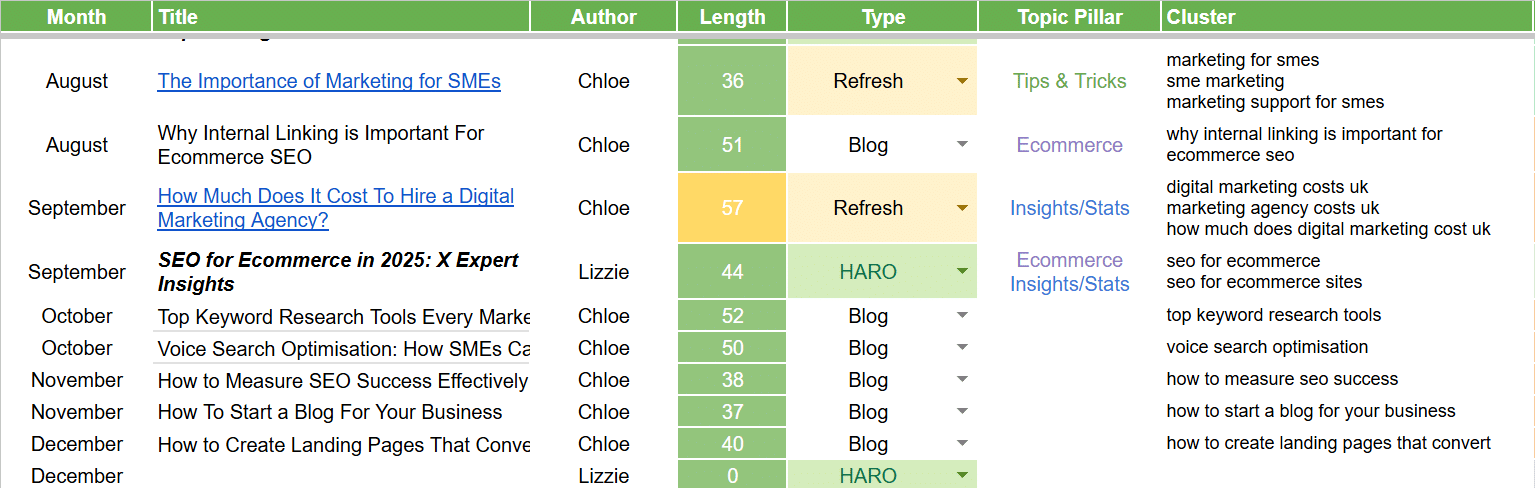
Example content calendar
Planning 1–4 posts per month around these themes is usually enough for most established businesses, as long as each article is in‑depth, genuinely useful, and clearly linked to a service or offer. Here is a simple example of what a calendar could look like for an SEO and paid media agency.

[Read the Full Dandy Case Study]
Step 4: Use SEO to pull in the right visitors
SEO (search engine optimisation) is where your blog really starts to earn its keep. The aim is not just to increase traffic, but to bring in visitors who are likely to become leads – those searching for solutions and strategies connected to what you sell. Focus on topics and keywords with clear business intent (for example, “B2B SEO agency pricing” rather than just “what is SEO”).
On‑page, you’ll want to:
- Write clear, descriptive SEO page titles and meta descriptions that match search intent and encourage clicks.
- Use headings, bullet points, and short paragraphs so time‑poor decision‑makers can scan and find value quickly.
- Add internal links from the blog to relevant landing pages and other supporting posts, using descriptive anchor text so both users and search engines understand the relationship.
Over time, keep an eye on which posts are driving organic traffic and conversions. Refresh those winners with updated data, stronger CTAs, and additional internal links to newer content in the same cluster.
Step 5: Make internal linking work for you
Internal linking is one of the simplest but most effective levers you can pull on a business blog. By strategically connecting posts, landing pages, and resources, you help visitors discover more of your content and signal to search engines which pages matter most. Think of links as signposts that guide people from early research right through to booking a demo or requesting a quote.
Some practical guidelines:
- Ensure every blog post links to at least one relevant landing page and two to three related posts.
- Give your top landing pages multiple internal links from high‑traffic, topically related articles to strengthen their authority.
- Use clear, descriptive anchor text (for example, “B2B SEO services” rather than “click here”) so users know what to expect and search engines can better understand your site structure.
Regularly reviewing and tightening your internal link structure can noticeably improve rankings, time on site, and the percentage of visitors who progress to a conversion page.
Step 6: Repurpose blog content for social and email
One of the biggest benefits of a business blog is how easy it is to update old blog posts for SEO across your marketing channels. Instead of starting from scratch for every social update or email campaign, you can spin a single strong article into multiple touchpoints that all lead people back to your website. This saves time and keeps your messaging consistent across platforms.
For example, from one blog post you could create:
- Several LinkedIn posts each focusing on a single insight, stat, or mini‑story from the article, all linking back to the blog or a relevant landing page.
- A short video or webinar discussion where your team walks through the key points, which you can then share on YouTube and social, and embed back into the original post.
- An email newsletter segment summarising the main takeaways with a “read the full guide” call‑to‑action that drives subscribers back to your site.
This repurposing approach helps you reach people wherever they spend time – social feeds, inboxes, search results – while keeping your website as the central hub where deeper content and conversions live.
Step 7: Track your blog’ performance and keep improving
To make sure your blog is doing its job, you’ll want to track your blog’s performance. Set up analytics to see which posts attract the right visitors, how often those visitors move on to key landing pages, and which articles show up in journeys that end in a lead or sale. Over time, this data will tell you which topics, formats, and CTAs deserve more investment.
Look in particular at:
- Organic traffic growth for your priority topics and service areas.
- Click‑through rates from blog posts to landing pages, and conversion rates on those pages.
- Assisted conversions, where a blog post appears in the path to a deal even if it wasn’t the last page visited.
Use these insights to refine your calendar, double down on what works, refresh under‑performing articles, and test new angles that align with your audience’s evolving questions and challenges.
[Grab Your Free SEO Audit Now]
Tips and Troubleshooting
Every blogging journey has bumps. Here are top tips for business blogging smooth sailing:
- Don’t neglect SEO basics or analytics.
- Avoid inconsistent posting, an editorial calendar helps!
- Include legal and disclaimer pages for compliance.
- Use internal links to connect valuable content and improve navigation.

Key Takeaways
- Choose the best blogging platform and blog name for your needs.
- Develop a content plan and a regular writing process for your entire blog.
- Focus on quality content, SEO, and performance tracking.
- Promote your blog online to build a lively, engaged community.
Closing Thoughts
Now you’re ready to start writing and hit publish on your business blog! Remember, many successful businesses began with just a handful of posts and a clear step by step guide. With the instructions above, your blog content will keep readers engaged and help your company blog grow.
At Dandy, we specialise in helping businesses like yours develop SEO-driven strategies that actually move the needle. Whether you’re looking to boost organic traffic, generate leads, or improve brand visibility, we create tailored solutions that align with your goals and deliver real results.
No strategy, no rankings. Let’s change that. Explore our expert SEO packages and take the first step towards content that converts.
If you’re ready to get started, grab your free website SEO audit today.
FAQs
How do I come up with strong blog post titles for a business audience?
Great blog post titles start with clarity: make it obvious who the post is for and what problem it solves, then layer in your primary keyword so it supports your website’s SEO at the same time. Aim for titles that promise a tangible outcome (for example, “How to…” or “X ways to…”) and reflect the specific blog topic your ideal customers are actually searching for, rather than something vague or clever that only makes sense internally.
What’s the best way to approach writing posts so they drive more traffic and leads?
When writing posts for a business blog, begin with keyword research so you understand the exact phrases and questions your audience uses, then structure the article around answering those clearly and in depth. From there, keep the tone conversational but focused, use subheadings to break up the content, and add clear calls‑to‑action so every time you publish posts you’re not only attracting more traffic, but also nudging readers towards your key landing pages and offers.
How can blog content improve my website’s SEO over time?
Every well‑optimised blog topic you cover becomes another entry point into your site, especially if you base it on solid keyword research and include internal links to related pages. By consistently publishing high‑quality articles, refining your blog post titles, and updating existing pieces as you learn which writing posts perform best, you build a wider net of relevant content that strengthens your website’s SEO and brings in qualified visitors month after month.

The Ultimate SEO Audit Checklist for 2026
February 12, 2026
Quick Wins To Improve Your Core Web Vitals
February 4, 2026
How to Measure SEO Success Effectively
January 16, 2026