
So, you’re in the mood for a little snack and want to find a cosy cafe in your local area. You fire up Google, and in no time, you’re presented with a whole list of options. But what makes you visit any particular one of them?
More often than you’d think, it’s a Google Business Profile that stands out: maybe brimming with reviews, maybe even with some mouth-watering photos of their signature flat white coffee proudly on display.
For local businesses, having a good Google Business Profile is like having a virtual storefront that attracts customers who might pass you by on the streets.
For businesses where local searches are everything, you’ll want to get this right.
In this post, we’ll show you how you can enhance your Google Business Profile so you’re not only more visible in local search, but also instantly recognisable on Google to your new customers. We’ll walk you through the basic steps we take at Dandy to enhance Google Business Profiles for our clients.
How Google Ranks Business Profiles
Before optimising, understand what actually drives visibility. Google uses three core factors:
- Relevance: How well your profile matches the search
- Distance: Proximity to the searcher
- Prominence: Authority, reviews, and engagement signals
Everything below maps back to improving one (or more) of these.
7 essential steps for optimising your Google Business Profile for SEO
Google My Business was rebranded to Google Business Profile in 2021, and is essentially Google’s free tool for businesses to manage how they appear in local Search Engine Results Pages and Google Maps.
The tool includes basic information such as your business’s name, location, phone number, website, hours, reviews, photos, and posts, all displayed in search engine results.
Before you actually start with your Google Business Profile, you should understand your service area, target audience, and industry, to make sure that your plan is in sync with your overall business strategy. Once you have these details to hand, you can get the most out of your profile.
Here are our 7 simple steps to optimise your Google Business Profile, along with specific checks for each, to help your profile stand out more.
Step 1: Access your Google Maps listing
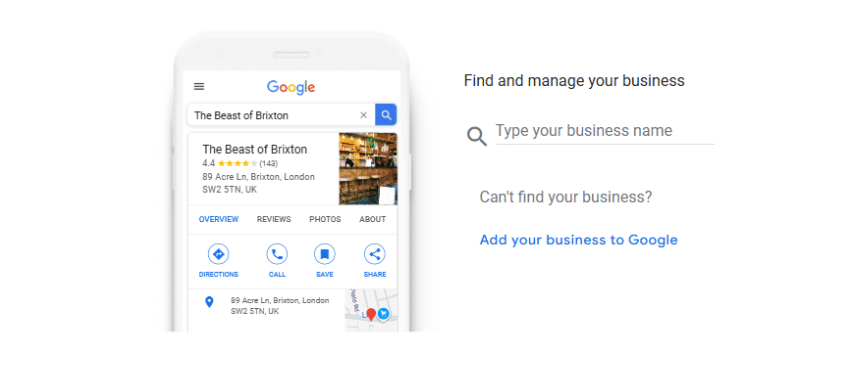
Source: Google My Business, Add or Claim Your Business Page
The first step to improving your Google Maps optimisation is to verify your ownership of the Google Maps business listing. This will improve your business’s visibility on the Google Maps platform.
You should also check for any duplicate listings and remove or claim them.
Step 2: Start with your basic profile checks
Ensure business information accuracy and profile completeness for your business account. This will help improve the visibility of the business on Google Maps.
- Business name consistency: Make sure that your business name and physical address on Google are the exact same as your website and other profiles. Inconsistencies can confuse search engines as well as potential customers.
- Primary category verification: Choose a primary category that accurately reflects the nature of your business. It’s this category that helps Google understand what your business does and offers.
- Contact information accuracy: Double-check that every detail in your business account, from your phone number to email addresses and physical location, is current and mirrors what’s on your website.
Each of these elements is part of a broader, ongoing audit to ensure your business information remains accurate and pertinent. Verification and updates are ongoing tasks that enhance your local search visibility.
Step 3: Engage via reviews
Your approach to business reviews can greatly impact your business, especially when it comes to customer decisions and improving your local search rankings.
To get more positive reviews from your clients or customers, here are a few tips from Google itself:
- Encourage more reviews: Use different opportunities to get more reviews from your customers or clients. It may be through email marketing or in-shop engagement, such as asking customers to scan a QR code. The more platforms your business can engage in to get customer reviews, the bigger your impact will be.
- Reply to reviews: Make sure to respond to all your reviews, whether they are positive reviews or negative.
- Value all reviews: Honest and balanced reviews can help potential customers decide.
- Keep it short and simple: Your customers or clients will appreciate your genuine feedback, but keep in mind that long reviews may confuse them.
- Respond in a timely manner: It is a great way to demonstrate your value for your customer’s feedback.
By responding to your customers’ feedback, you are not only building trust, you are also telling search engines that your business is alive and well, and this could help you rise in local SEO strategies.
Find your business’s combined review ratings
For service-based businesses, users can rate different aspects of their experience through GBP reviews.
Once you’ve been up and running for a while with your GBP, to find and benchmark your Google Business Profile’s combined ratings, you can:
- Open Google Search on your computer
- Select your business on the map or search for it
- Scroll down to find ‘Review summary’
- Select an aspect like ‘Price’ to filter reviews for performance tracking
Step 4: Showcase your in-store products
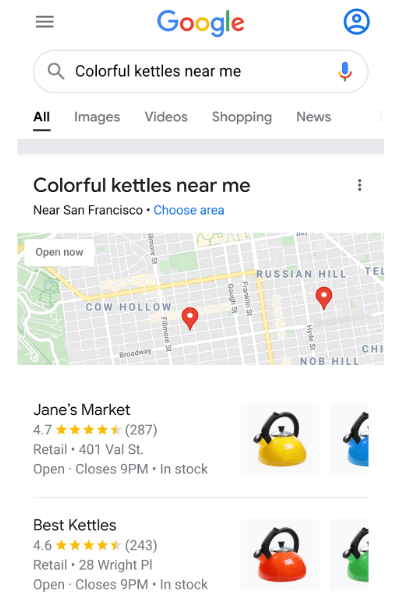
Source: Google Business Profile Support
Having more enhanced product listings does not only make your products more noticeable but also maximizes the number of local search results. The more recognisable and accessible your products are, the more they can convert into foot traffic and sales.
To optimise GBP for products:
- Add and optimise product listings: Make sure that all your products have been added to the system and that they have been categorised and keyworded. This is crucial to ensure that your products show up in the appropriate customer searches.
- Utilise visual content: Add high-quality images that showcase the best of your products and their different features. Visual content can help attract and engage more customers as they get to see and taste what you have to offer through your products.
- Use UTMs: When adding information to your products, use custom-made UTM links to get more information about the source of your traffic. We like the free tool GA-Dev-Tools campaign URL builder.
Step 5: Highlight services offered
Optimised service descriptions can help increase local business recognizability. They help customers to find exactly what they are looking for and lead them straight to your doorstep.
Here is a guide on how to optimise your service listings for your GBP:
- Service listings and details: Clearly define and describe your services to ensure they are directly linked to what customers are searching for.
- Include custom services: Develop unique services that cater to local customer preferences or needs. It will give your business a competitive advantage in terms of customer outreach.
- Query-focused service descriptions: Detailed service descriptions that align with keyword research can be necessary to help search engines correctly index your business.
Step 6: Create posts to share offers, events and other updates
Posts are essential if you really want to drive results through your local listings. To create posts in your Google Business Profile:
- Go to your Google Business Profile.
- Select Posts.
- Click Add post.
- At the top, choose your post type:
- Update: Share news or information about your business.
- Offer: Promote sales, deals, or special discounts.
- Event: Publicise an upcoming event at your business.
- Fill in all the details for your post.
- (Optional) Under Add more details, include extra information such as a coupon code or link to redeem an offer.
- When everything looks ready, click Post in the bottom right to publish.
Tips for great GBP posts:
- Use good visuals or photos. They make your profile more appealing to potential customers and help in increasing the signal for search engines.
- Your logo, cover photos, and other images must be of high quality.
- Using geotagged images can help in creating a sense of presence and show that your business is relevant to the area.
- All images must be professional and in line with the values of your business.
- Consider leveraging videos for your Google Posts. Videos are not only more engaging but also communicate information effectively, helping you stand out. So why not capture a few clips of your team showcasing services or announcing special offers?
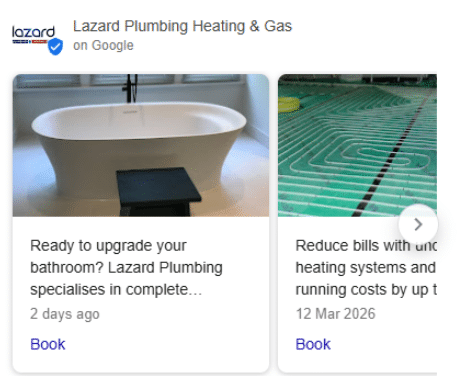
Recent Client Google Business Posts
Step 7: Support customers directly with Q&A
Communicating with your customers through Q&A and posts is good for your local SEO. It’s also a fun way to connect with your past and new customers. When you communicate frequently through these methods, you establish trust and show that you are a friendly and accessible business, and this is good for SEO. Here’s how to do it well:
- Respond to all questions on your profile quickly. Responding quickly helps you establish your reputation as a trustworthy and accessible business.
- Ask questions, or ask for questions, using Google Posts to start conversations and get to the nitty-gritty of your customer needs.
8. Maximise Engagement Signals
Google tracks how users interact with your listing.
Focus on increasing:
- Clicks to your website
- Calls
- Direction requests
Practical ways to do this:
- Add “Get Directions” links on your website and emails
- Use GBP links with UTMs to track performance
- Optimise your title and images to improve click-through rate
These behavioural signals are increasingly important for local rankings.
Google Maps Hacks by Simon Weckert
A twist on an odd test made driving directions a smart move for getting seen in local search. But you can skip the wild black-hat tactics like using fleets of smartphones to simulate foot traffic. Here’s a more practical approach, using the same basic idea but making it easier to apply:
- Google your business name.
- Click “Directions” in the Knowledge Panel.
- Use the map URL from the address bar as a direct link for customers.
You can add the link to emails and text reminders, prominently on your site’s contact page, or include it in event communications. The more people request directions via your link, the stronger the engagement signals sent to search engines, leading potentially to a better local ranking.
Summary and key takeaways
Here’s a simple summary of the critical SEO best practices for Google Business Profile:
- The first step is Google Maps listing control, which requires you to verify your business listing.
- Your business name and category and contact details must match between Google and your website and all other platforms.
- Your business credibility will increase when you actively handle customer feedback via reviews, because it helps people trust your profile more.
- Your product listings should include targeted keywords which should be based on local keyword research together with high-quality images that make your products visible in specific search results.
- Visuals must provide high quality to strengthen brand identity which should be achieved through posts that present offers and answer essential customer questions.
- The Q&A section needs regular updates while Google Posts should be updated to support customer communication.
- The get directions link should be utilised because it helps create footfall simulations which increase future local ranking results.
By integrating these strategies, you’re building a digital handshake with potential customers that can lead to real-world success.
For tailor-made SEO packages that include these Google Business Profile optimisation steps, reach out to Dandy Marketing. We’re an SEO-first digital marketing agency that offers full-service SEO, AI search optimisation, PPC management, and more, and we’d love to hear from you.
How to Optimise Google Business Profile for SEO FAQs
What’s the point of a Google Business Profile for local SEO?
Think of your Google Business Profile as your shop window on Google. It shows off who you are, where you are, and what you do, right there in the search results pages. If it’s set up properly, it can seriously boost your local SEO efforts and help more people find (and choose) your business.
Do bad reviews really hurt your Google ranking?
Bad reviews can hurt a bit, depending on how many and the severity of the reviews, but they’re not the end of the world. A few negative reviews won’t tank your SEO, but if you ignore them, it can put people off. Responding quickly and professionally shows that you care and turns a potential problem into a chance to prove your reliability. Taking real negative reviews seriously is important, but also keep an eye out for any spam and action getting them removed ASAP if they do pop up – we’ve seen it happen for clients a few times!
How can I make my GBP business description work harder?
To improve local SEO, write your GBP business description like you’re telling someone who’s never heard of you what makes your business special. Keep it natural but sprinkle in some keywords people might search for. That helps Google understand what you do and puts you in front of the right audience.
Why does having the correct business information on Google Maps matter so much?
Because if people can’t find you, they can’t buy from you. Keeping your contact details, business category, opening hours, and business location accurate saves your customers time and builds trust. Plus, Google favours up-to-date, reliable listings, so it’s a simple win for both visibility and credibility.
When did Google My Business change to Google Business Profile?
Google My Business (GMB) was rebranded to Google Business Profile in 2021.