The Ultimate SEO Audit Checklist for 2026


Getting a solid online presence up and running is crucial for any business looking to grow its online reach. And a good SEO audit can give you a major head start – think of it as a thorough health check for your website that picks up on all the potential issues and niggling problems that are holding you back from getting seen by the people you need to reach.
A pro can help you identify the problems and make the most of all the opportunities your website has. You can expect some impressive returns on investment if you carry out regular SEO audits: increased traffic, more conversions… all sorts of benefits that make all the hard work worthwhile.
The Essential Bits of Technical SEO
From our point of view, technical SEO is the foundation of any successful SEO plan.
It’s what gets your website up and running, and allows search engines to find and use it as well as it possibly can. A shaky foundation here and all your other optimisation efforts are going to struggle – so it makes sense to start here.
1.1 Getting Your Site Crawled and Indexed
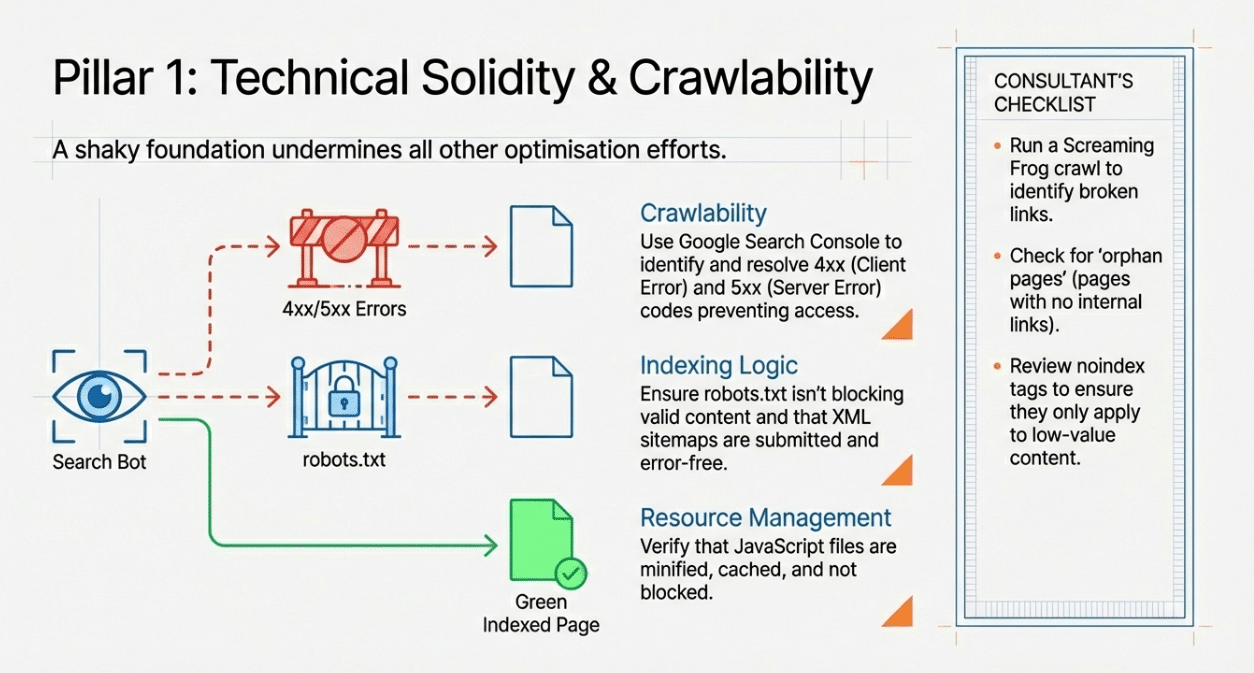
If you’re serious about getting good results from your SEO, you need to get your site crawled and indexed. And here’s how to do it:
- Use a tool like Google Search Console to:
- Find those pesky 4xx/5xx errors that are preventing crawlers from reaching certain pages.
- Make sure all the important pages of your site are being indexed properly.
- Keep an eye out for any problems that might prevent your site from getting indexed in the first place.
- With Screaming Frog, you can crawl your entire site and:
- Find out which links are broken and not doing anything for you.
- Surface any duplicate content or pages that are not quite right – and remove them.
- Take a look at how you’re using your canonical tags – on the right pages, and in the right way?
- Take a good hard look at your robots meta tag – are you letting the right stuff get indexed, and not letting the wrong stuff through?
- Check that your JS files are:
- Not getting blocked by your robots.txt file.
- Being minified and cached, so they don’t slow your site down.
1.2 Navigation & Sitemaps
A clear, simple website structure is the friend of both search engines and end-users. You want your most important pages to be easy to find, using your navigation and internal linking.
- Make sure your site organisation is logical and easy to follow
- Sort out your XML sitemap – and submit it to the search engines
- Run regular technical SEO audits – every few months is good – to keep on top of things

1.3 The Quick and Easy Technical SEO Checklist
What to Do
- Indexing Check your indexed vs submitted pages; check for blocked URLs; take a good look at your robots meta tags
- Canonicals Make sure your key pages and category pages have the right canonical tags
- JavaScript & CSS Check that your JS and CSS files are being used, and not causing any problems
- HTTPS Make sure you’re serving your site over HTTPS – and that you’re not getting any mixed content errors
- Server Performance Check your server response time, uptime and any spikes in 5xx errors
1.4 How to Manage AI Crawlers
New AI bots are crawling the web like mad – and you need to keep an eye on them.
- Review your robots.txt file to decide which AI crawlers you allow in and which you block
- Keep an eye on your server logs to make sure your AI crawlers aren’t using up too much bandwidth – and take action if they are
2. On-page SEO Audit Techniques
On-page SEO is all about getting individual web pages to rank better on the search engine results pages, and getting more of the right traffic coming to your site. It’s all about getting the content and HTML on each page right – so that users and search engines can understand it easily.
2.1 Get Your Meta Tags and Headers in Order
Meta tags and headers are two of the most important bits of on-page SEO – and it’s worth getting them right.
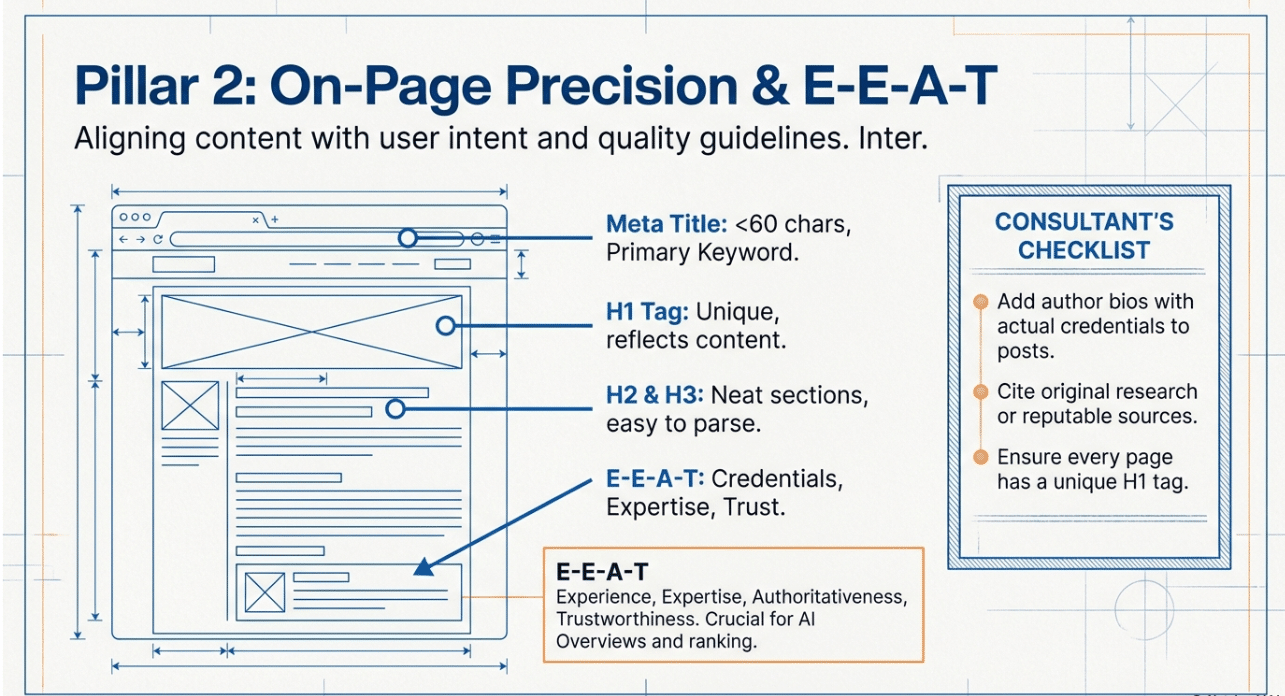
- Your title tag and H1 should clearly reflect the primary keyword you’re targeting – and be no longer than 60 characters if you can help it.
- Your meta description should be as unique as possible – around 155-160 characters is a good length – and should include a clear call to action and some of the right keywords.
- Oh, and by the way – make sure most of your websites have got a meta description – it’s a common problem that can stop you getting seen by search engines.* Headings (H1, H2, H3):
- Use headings to break up your content into nice, neat sections and make it easy to understand.
- Make sure your headings are actually worth reading – align them with what people are searching for and what your content is all about.
2.2 Content Quality and Keyword Usage
The quality of your content is the foundation of a good SEO strategy – after all, no one’s going to link to a bunch of rubbish.
- Have a look through and make sure you’re not:
- Repeating yourself endlessly, or having pages with too little content to be useful.
- Missing out on meta descriptions and title tags – that’s just lazy.
- Writing content that’s supposed to match a search but doesn’t even come close
- Now, make sure your content is:
- Using keywords naturally – don’t try to stuff them in there like you’re trying to win some sort of bet.
- Focused on your target keywords and what people are actually searching for, rather than just what you think they should be searching for.
- Well-linked from other pages, with anchor text that makes sense.
- Use some decent keyword research tools (like SEMrush) to:
- Get a sense of whether the keywords you’re using are actually relevant.
- Find out if there are any gaps in your content that need filling.
- Make sure your on-page SEO is in line with the rest of your SEO strategy.
2.3 E-E-A-T (Experience, Expertise, Authoritativeness, Trustworthiness)
Google’s quality guidelines put a lot of weight on E-E-A-T, and that’s especially true now that AI Overviews are referencing credible sources all the time.
- Add or improve:
- A proper author bio with some actual credentials.
- Some original research or case studies to show you know what you’re talking about.
- Some links to other reputable sources where appropriate.
- Just generally, make sure your brand is coming across as consistent, accurate and trustworthy online.
Get yourself a free SEO audit today
3. Off-page SEO and Backlink Analysis
Off-page SEO is all the stuff that happens outside of your website, but still affects how you rank. Having a strong backlink profile is really important for building authority and getting better search engine rankings.

3.1 Backlink Quality and Relevance
- Use a tool like Ahrefs to:
- Get an idea of whether your backlinks are any good.
- Figure out if there are any toxic links or patterns of low-quality links you should be worried about.
- Here’s some best practice:
- Focus on getting links from reputable, relevant websites.
- Use descriptive anchor text – both for internal and external links.
- Don’t overdo it with your anchor text, or it starts to look like you’re trying to manipulate things.
- And then there’s the disavow tool – use it only as a last resort, for:
- When you’ve got a manual action in Search Console.
- When you’re dealing with a big, coordinated negative SEO attack with loads of spammy links.
3.2 Social Signals and Brand Mentions
- Keep an eye on:
- How many times your brand gets mentioned on social media, and how many links come from there.
- How often your brand appears on AI-powered search tools and chatbots.
- And try to encourage:
- People to share your content on social, where it can get some extra links.
- PR and digital campaigns that earn you some nice, natural links.
4. Advanced Keyword Research Methods
Getting the right keywords is key to a successful SEO strategy and any good audit.
4.1 Finding High-Value Keywords
- Use tools like Google Keyword Planner and SEMrush to:
- Figure out which keywords have a good balance of search volume and competition.
- Identify some long-tail keywords that can bring in some pretty targeted traffic.
- Now, start thinking about mapping target keywords to specific landing pages – make sure each important keyword has its own page that’s been properly optimised.
4.2 Competitor Analysis
- Take a look at:
- How well your competitors are doing in the rankings, and what keywords they’re targeting.
- Whether there are any gaps in their content that you can take advantage of.
- And adjust your keyword targeting and SEO strategy to focus on areas where you can actually compete.
4.3 Multiple Pages Targeting & Entities
- Don’t have multiple pages targeting the same keyword unless there’s a clear reason for it – like a different intent.
- Instead, think in terms of entities – like people, products, services, locations, and concepts.
- Make sure you clearly define and connect entities in your content, so search engines and AI understand what’s going on.
5. Enhancing User Experience and Site Speed
Your website’s Core Web Vitals – like page speed and how fast your content loads – directly affect how search engines rank you, how users experience your website, and how many conversions you get.
5.1 Core Web Vitals and Site Speed
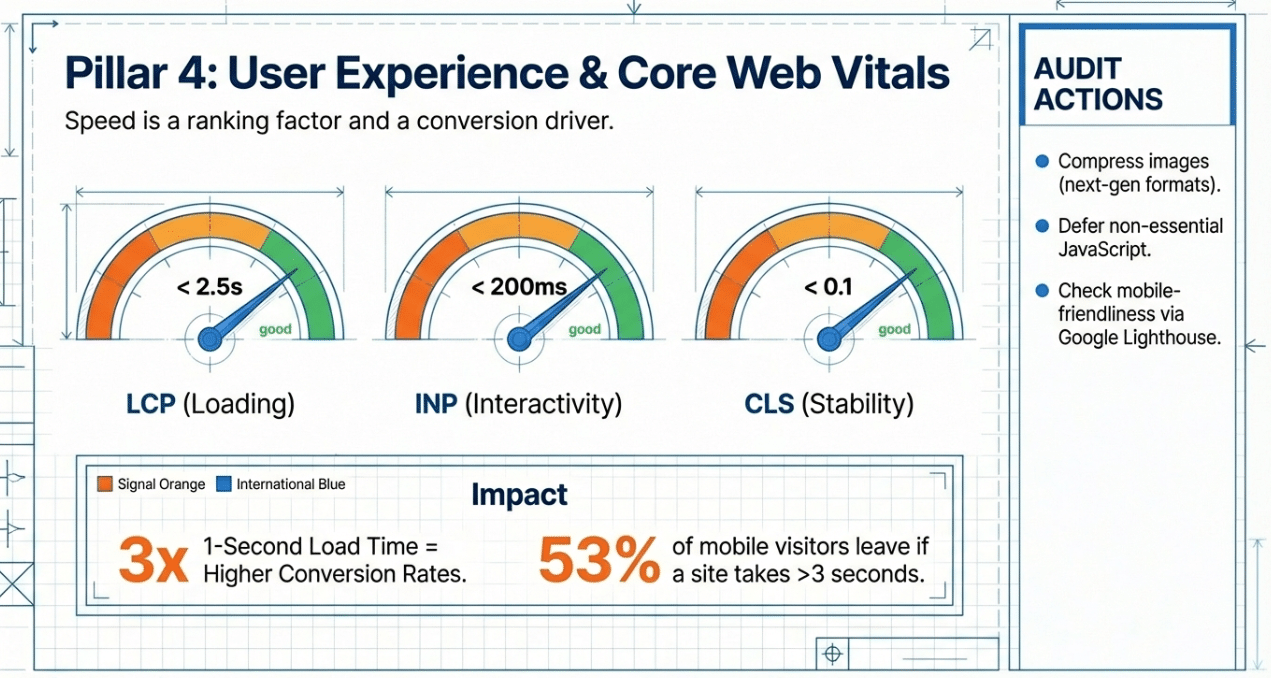
Core Web Vitals currently include:
- Largest Contentful Paint (LCP): how fast your content loads – aim for under 2.5 seconds.
- Interaction to Next Paint (INP): how fast your site is interactive – aim for under 200 ms.
- Cumulative Layout Shift (CLS): how well your site looks while it’s loading – aim for under 0.1Only a pretty small proportion of sites are actually meeting Googles’ core web vitals usability standards. This means that a site speed and performance-focused technical SEO review – done right – can make you look like a serious contender in your market.
To get a better page speed and site performance:
- Optimise and compress those images that are just full of pixels and not much else.
- Minify CSS and JavaScript files so they don’t weigh your site down.
- Leverage browser caching and a content delivery network (cdn) to speed things up.
- Defer that non-essential JavaScript so your site can load faster.
- Try to keep those server response times as low as possible.
Research from Portent shows that pages that load in 1 second are seeing conversion rates 3 times higher than those that are taking 5 seconds to load – and a whopping 53% of mobile visitors will give up and leave a site if it takes longer than 3 seconds to load.
5.2 Mobile Friendliness
- Make sure your site looks alright on all sorts of devices – youre only failing if it looks rubbish on even one of them.
- Use something like Google Lighthouse or PageSpeed Insights to:
- Check how mobile-friendly your site is.
- Get some feedback on those tap targets, font sizes, and layout shifts.
- Make sure mobile UX is something you actually take seriously and build into your website’s functionality – its a key part of a proper UX and SEO website audit.
6. Optimising for AI Overviews
Google’s AI Overviews are now turning up for a significant chunk of search results – so being referenced in these summaries can get you a ton of visibility and organic traffic, even if you’re not number one on the search engine rankings.

6.1 Content Structure for AI
- Use:
- Clear headings (h2 & h3) to break up the text.
- Introductions that get straight to the point and don’t beat around the bush.
- Bullet points and numbered lists to break up long passages of text and explain complex points.
- Make sure:
- Your content is written in a way that people will actually read and enjoy – but also in a way that makes it easy for Google to parse and understand.
- Youve got search intent spot on for each page.
6.2 Schema Markup and Structured Data
- Add some structured data (FAQ, How-To, Article, Organisation, LocalBusiness, etc.) to important pages.
- Get your structured data validated with Google’s Rich Results Test.
- Make sure schema is high up on your list when doing a technical SEO audit, its a key part of getting that AI Overview business going.
6.3 Monitoring AI Visibility
- Check on your priority queries to see if your site is getting cited in those AI Overviews.
- Compare and contrast with competitors who are getting mentioned and those who arent – is it content quality, structure, E-E-A-T, and structured data that’s making the difference?
7. Analytics and Reporting
Regularly crunching your performance numbers is essential to understanding whats working, whats not, and where you can make some improvements.
7.1 Google Analytics and Search Console
- With Google Analytics 4 you should be tracking engagement rate, session duration, conversion events, and organic traffic.
- With Google Search Console:
- Keep an eye on search queries, impressions, and clicks.
- Check the indexing status and coverage issues and sort out those pages Google is telling you have errors.
- Use Search Console as one of your core tools for doing that SEO audit across multiple pages and URLs.
7.2 Reporting
- Build reports that are easy to read and give a clear picture of whats happening – keyword rankings, search visibility trends, landing pages that are up or down, Core Web Vitals etc.
- Always include:
- Some actionable next steps.
- A clear line to how the SEO audit checklist will actually help your overall business.
8. Security and HTTPS Implementation
Security is now an absolute must-have for any good technical SEO audit.
- Get HTTPS set up across your whole site.
- Fix those mixed content errors (http assets on https pages).
- Use security plugins or services to:
- Scan for malware and vulnerabilities.
- Automate backups and make sure you can get back to where you started if things go wrong.
9. Local SEO Optimisation
If your business serves customers in specific areas then you need a local SEO audit as a priority.
9.1 Google Business Profile
- Claim and optimise your Google Business Profile:
- Get your NAP (name, address, phone) completely accurate and consistent.
- Make sure your opening hours, website url and categories are all up to date.
- Post some new photos and keep the profile fresh and active.
- Get all your business details consistent across other directories and local citations.
9.2 Local Citations and Reviews
- Get your business listed in all the major local directories.
- Encourage reviews and build up your ratings on Google and all the other important platforms.
- Keep an eye on your reviews and get back to customers whove got something to say about you.
👉 About 76% of mobile users will pop by a business within 24 hours of doing a local search – and 80% of those searches will convert into actual customers.
10. Content Audit and Strategy
You need to be regularly reviewing your content to make sure its meeting user needs and SEO objectives.
10.1 Content Inventory
- Make a list of pages that are underperforming:
- Underperforming pages and categories.
- Duplicate content and missing meta descriptions.
- Landing pages with poor engagement or really high drop-off.
- Decide whether to:
- Update and improve content quality.
- Consolidate similar pages.
- Get rid of or noindex low-value content.## 10.2 Content Strategy Development
- Develop a forward-looking content strategy that actually answers people’s questions and matches the search intent your users have.
- Make sure your content strategy supports your target keywords and entities at every stage of the buyer’s journey.
- Structure your content to perform on both traditional search results pages and on those AI-generated summaries and Overviews.
- Make sure structured data is part of your standard content publishing process – it will pay off in the long run.
Get in Touch
11. SEO Tools – A Comparison
When conducting an SEO audit checklist, using the right SEO tools makes the audit process faster and more accurate.
| Tool | Key Features | Best For | Price Range |
|---|---|---|---|
| Google Search Console | Crawl errors, indexing status, performance reports | Beginners and small businesses | Free |
| Google Lighthouse | Performance, accessibility, mobile friendliness, basic SEO checks | Core Web Vitals and mobile testing | Free |
| Ahrefs | Backlink profile analysis, keyword research, site audit | Advanced users and SEO agencies | From ~$129/mo |
| SEMrush | Keyword research, competitor analysis, on page SEO audit, site audit | Comprehensive SEO strategies | From ~$139/mo |
| Screaming Frog | Technical SEO audits, site structure analysis, identify pages lacking canonical tags or with other SEO issues | Technical SEO specialists | Free (up to 500 URLs) / £259/yr |
Each of these SEO tools brings something different to the table – from simple monitoring to in-depth analysis. Tools like Screaming Frog or Moz Pro can really help you track down pages that lack canonical tags or other SEO issues during a site crawl – making it easier to address duplicate content or indexing problems.
Summary and Key Takeaways
A well-structured SEO audit checklist makes all the difference when it comes to improving your website’s performance and search visibility:
- Technical SEO: Crawl the whole site, fix broken pages and links, use canonical tags sensibly, keep XML sitemaps simple, and sort out those AI crawlers.
- On-page SEO: Get your title tags and meta descriptions sorted, meta tags, headers, and content quality all increased; make sure keyword targeting matches search intent; strengthen your internal linking.
- Off-page SEO: Build and grow a healthy backlink profile, avoid those toxic links, and only disavow as a last resort.
- Keyword Research: Map target keywords to your key pages, don’t have multiple pages targeting the same term without a reason, and really think about entities.
- User Experience: Improve your Core Web Vitals, page speed, site speed and mobile friendliness to support your rankings and conversions.
- AI Overviews: Make sure your content is structured for AI extractability and support it with structured data.
- Analytics: Use Google Analytics and Search Console to track your progress and make informed decisions.
- Security: Sort out HTTPS and stay on top of potential threats.
- Local SEO: Do a local SEO audit for your Google Business Profile, local citations, and reviews.
Regular SEO audits are top priority for maintaining and improving your search engine rankings and Google rankings. They help business owners stay ahead of the competition by spotting and fixing SEO issues before they affect performance – and that can lead to improved conversion rates by fixing those pesky user experience issues.
Closing Thoughts
SEO is not a one-time project; it’s a never-ending process that rewards consistency. By using this SEO audit checklist, you can make systematic improvements to your website’s health, visibility and results over time.
Take your website to the next level with Dandy’s bespoke SEO services that really put results and clarity first.
👉 Get a free SEO audit today and get your site working smarter, not harder.
FAQs
How do Core Web Vitals impact an SEO website audit?
Core Web Vitals measure how well your site loads (LCP), how fast it starts to interact with users (INP), and how stable it looks (CLS) – all super important for figuring out how users experience your site. During an SEO website audit, taking a close look at these metrics will help you spot any technical SEO issues that may be reducing your search visibility and keyword rankings. Improving Core Web Vitals usually means optimising images, scripts and server response times to create a faster and more stable experience for users and search engines.
What should I be looking for when auditing multiple pages for broken links and internal linking?
Scan for broken links that lead to 4xx or 5xx errors – these can harm user experience and slow down crawl efficiency. At the same time, review internal linking to make sure important pages and landing pages are supported with clear, descriptive anchor text that signals relevance to search engines. A strong internal linking structure distributes authority, helps search engines find deeper content and generally improves search visibility.
Do I need to be some sort of SEO genius to improve keyword rankings and search visibility?
You don’t need to be a SEO expert to start making a difference, but having a basic idea of how to do a SEO website audit is pretty helpful. If you’re reviewing your site regularly, fixing those pesky broken links, making sure your internal links are clear and your content is actually related to the keywords on your key pages – and that all those bits and bobs are in check – then you can start to see an increase in organic traffic and search visibility over time. Of course the more your site grows the more you’ll find you need to get into some of the more in-depth technical skills like looking at log files and implementing schema – but these can really help take things to the next level.
How is Google AI Overviews going to affect my SEO audit?
Google AI Overviews are pretty much everywhere now – they are AI-powered summaries that pop up at the top of your search results, and if you can get your site cited in those then it can give you a major visibility and click-through rate boost. So, when you’re doing your audit, you should be checking the structure of your key pages to make sure they’re easy for the AI to use – clear headings, direct answers and some schema markup will all help. The truth is, optimising for AI Overviews has become as important as optimising for traditional rankings – so it’s worth making it a regular part of your SEO audit checklist.

Quick Wins To Improve Your Core Web Vitals
February 4, 2026
How To Start a Blog For Your Business
January 23, 2026
How to Measure SEO Success Effectively
January 16, 2026